Voice & Speech
SpeechTexter
Speech-to-text tool for voice typing and dictation in multiple languages
Website checked and live 5 days ago · how we check
Speech-to-Text
Voice Typing
Dictation
Transcription
Accessibility
Productivity
Voice Recognition
Writing Assistant
About SpeechTexter
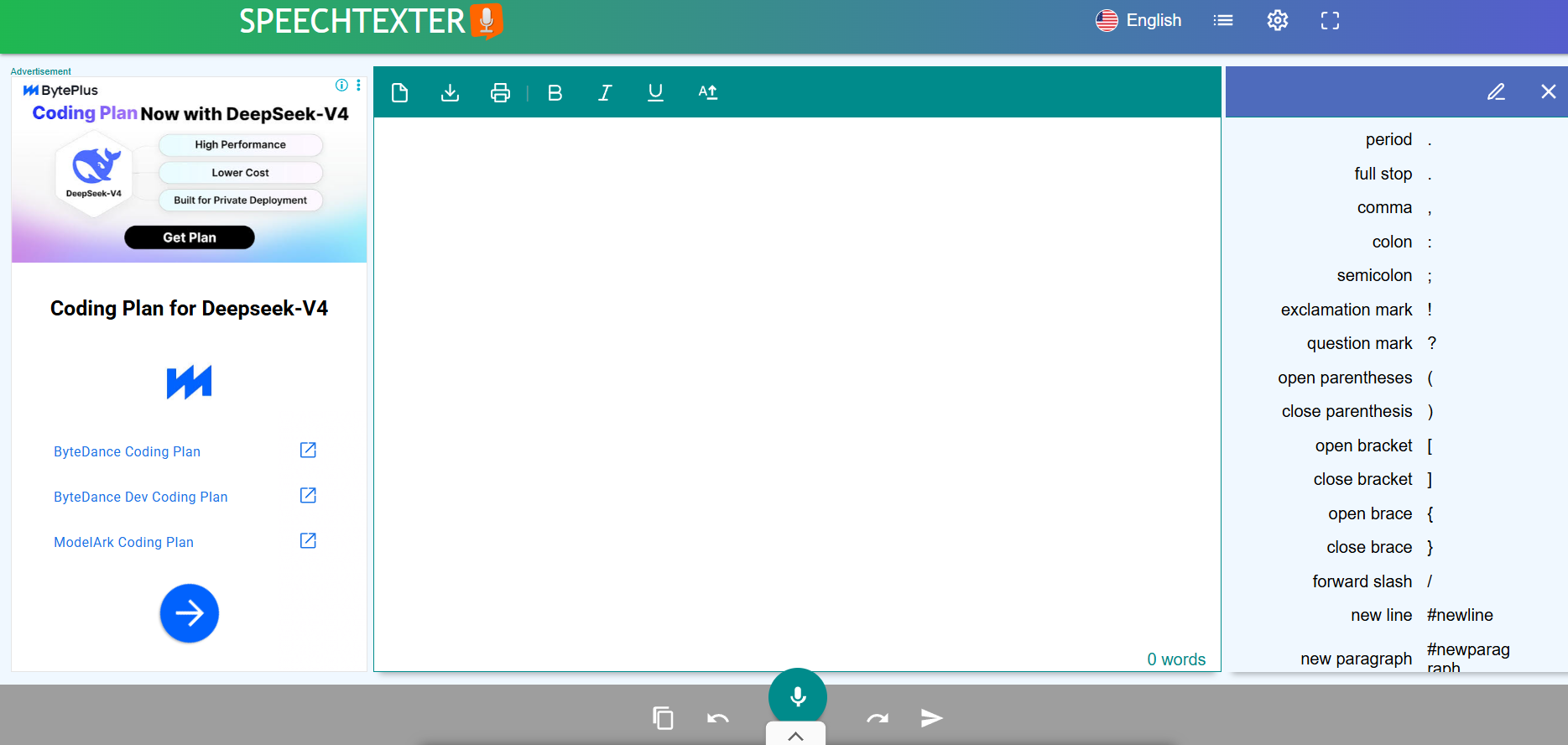
SpeechTexter is a free speech-to-text (voice typing) web app that lets you dictate text by speaking into your microphone, transcribing your voice into written text in real time across 60+ languages — useful for writing documents, notes, messages and more without typing. It's a straightforward, no-cost dictation tool that works right in your browser, popular with students, writers, people with typing difficulties, and anyone who thinks faster than they type.
You select your language, click to start, and speak — SpeechTexter transcribes as you go, and you can add custom voice commands for punctuation and formatting (saying "comma" or "new paragraph") to produce cleaner text. It supports many languages and dialects, works on desktop and mobile browsers, and lets you save or copy your transcribed text. A custom-commands feature lets you create shortcuts for frequently used phrases.
SpeechTexter is free to use in the browser, with a mobile app also available; it's supported by ads rather than subscriptions for core use.
Strengths: genuinely free, supports 60+ languages, works in the browser with no install, real-time transcription, and custom voice commands for punctuation. Weaknesses: accuracy depends heavily on your microphone quality, accent and background noise (as with all dictation), it lacks the advanced features and accuracy of premium tools like Dragon or modern AI transcription, and it's best for clear, deliberate speech rather than messy audio.
For students, writers and anyone wanting free voice typing in their browser across many languages, SpeechTexter is a handy, accessible tool — ideal for dictating first drafts, notes and messages when typing is slow or difficult. For professional transcription of recordings, dedicated AI transcription services go further, but for free live dictation, SpeechTexter does the job.
You select your language, click to start, and speak — SpeechTexter transcribes as you go, and you can add custom voice commands for punctuation and formatting (saying "comma" or "new paragraph") to produce cleaner text. It supports many languages and dialects, works on desktop and mobile browsers, and lets you save or copy your transcribed text. A custom-commands feature lets you create shortcuts for frequently used phrases.
SpeechTexter is free to use in the browser, with a mobile app also available; it's supported by ads rather than subscriptions for core use.
Strengths: genuinely free, supports 60+ languages, works in the browser with no install, real-time transcription, and custom voice commands for punctuation. Weaknesses: accuracy depends heavily on your microphone quality, accent and background noise (as with all dictation), it lacks the advanced features and accuracy of premium tools like Dragon or modern AI transcription, and it's best for clear, deliberate speech rather than messy audio.
For students, writers and anyone wanting free voice typing in their browser across many languages, SpeechTexter is a handy, accessible tool — ideal for dictating first drafts, notes and messages when typing is slow or difficult. For professional transcription of recordings, dedicated AI transcription services go further, but for free live dictation, SpeechTexter does the job.
Frequently Asked Questions
What is SpeechTexter and who is it designed for?
SpeechTexter is a popular, free multilingual speech-to-text application engineered to convert spoken words into written text in real time. It is widely used by students, bloggers, teachers, writers, and individuals who want to minimize the physical effort of typing. The platform is also a valuable digital accessibility resource for people who have difficulty using their hands due to physical trauma, repetitive strain, or other motor disabilities that limit conventional keyboard input devices.
How does the application function technically, and does it require installation?
The software is entirely browser-based and cloud-hosted, meaning it operates instantly on desktop computers and mobile devices without requiring any software installations, browser plugins, or user account registrations. To capture real-time audio, it connects directly to your device's microphone. It runs its primary speech recognition processes through Google’s native browser-based speech engine, allowing it to accurately output spoken words as fast as a user can talk.
How many languages are supported, and how does it assist with language learning?
SpeechTexter natively recognizes and transcribes speech in over 70 international languages and specific localized accents (such as distinguishing between US, UK, or Indian English). Because the engine requires crisp, clear word articulation for optimal text output, many non-native speakers and students utilize the platform as a practical self-evaluation tool. By practicing dictation, users can systematically test their foreign language pronunciation accuracy and build conversational speaking fluency.
Can users add custom voice commands for formatting and punctuation?
Yes, the platform features a customizable voice commands list that gives users complete control over their document formatting without needing to touch a keyboard. Users can look up or define specific vocal cues to automatically insert punctuation marks (such as commas, question marks, and periods), execute software actions (like "undo" or "redo"), or trigger structural document changes (such as starting a "new paragraph").
Is SpeechTexter free?
Yes — free to use in your browser, with a mobile app available, supported by ads rather than subscriptions for core use.
How many languages does SpeechTexter support?
60+ languages and dialects, making it useful for voice typing in many languages directly in the browser.
How accurate is SpeechTexter?
Accuracy depends on your microphone, accent, and background noise. With clear speech and a good mic it works well; noisy audio or unclear speech reduces accuracy, as with all dictation.
Can I add punctuation with SpeechTexter?
Yes — you can say commands like "comma," "period" or "new paragraph," and create custom voice commands for punctuation and frequent phrases.
What is SpeechTexter best for?
Free live voice typing — dictating documents, notes and messages in the browser — especially for people who type slowly, have typing difficulties, or think faster than they type.
Are you the maker of SpeechTexter?Add this badge to your website so visitors can see your rating.
110listing views
Live counters, all time. We show every maker the real numbers.

Want it in front of more people? Fast-track & upgrade this listing →
Alternatives
Best SpeechTexter Alternatives
Looking for something like SpeechTexter? These are the highest-scored Voice & Speech tools in our directory, ranked by score, never by who paid: Auphonic, Maestra, Hedy AI, TTSMaker, Picovoice and more.
Auphonic
Voice & Speech● Live
AI audio post-production tool for leveling, noise reduction, and encoding.

Maestra
Voice & Speech● Live
AI platform for transcription, subtitles, translation, and voiceovers
Hedy AI
Voice & Speech● Live
AI meeting coach with real-time transcription, summaries, and live guidance.

TTSMaker
Voice & Speech● Live
Free AI text-to-speech tool with multilingual voice generation

Picovoice
Voice & Speech● Live
oice AI platform for on-device speech recognition and wake words
Microsoft Azure Speech
Voice & Speech● Live
Enterprise speech-to-text and text-to-speech API by Microsoft Azure.

Bark
Voice & Speech● Live
Open-source generative AI model for speech, music, and audio

Kits.ai
Voice & Speech● Live
AI platform for voice cloning, voice generation, and vocal creation
📬 Get the best new AI tools by email
Only when we find tools worth your time. No spam, unsubscribe anytime.