Voice & Speech
Voicemaker
AI text-to-speech platform with realistic voices and audio export
Website checked and live 2 days ago · how we check
Text-to-Speech
AI Voices
Voiceover Generator
Audio Narration
Speech Synthesis
Content Creation
E-Learning
Multilingual Voices
About Voicemaker
Voicemaker is a text-to-speech platform that converts written text into natural-sounding speech using AI voices across 130+ languages and hundreds of voice options, letting users generate voiceovers for videos, presentations, e-learning, audiobooks and more, then download the audio files. It targets creators and businesses who need professional-sounding narration without hiring voice actors or recording themselves.
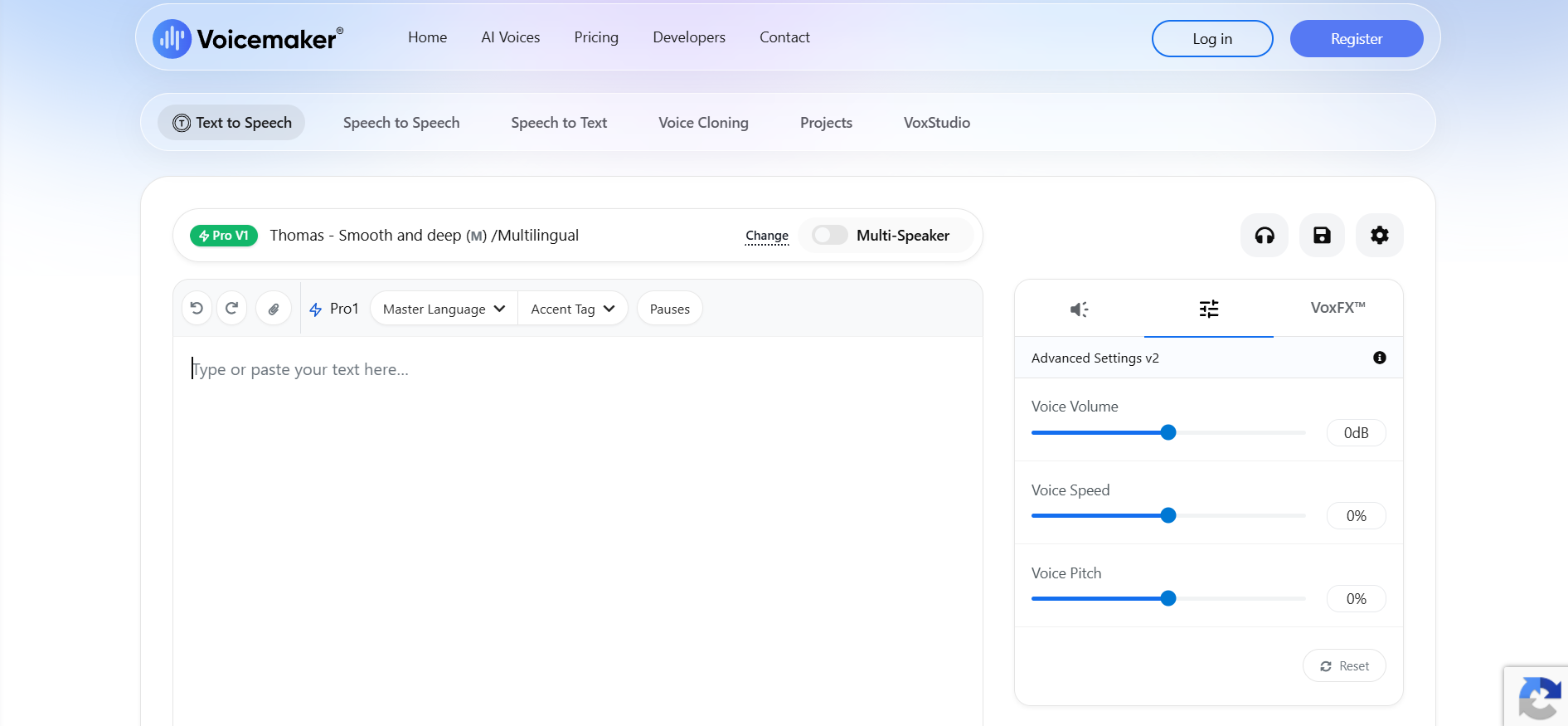
You type or paste text, choose from a large library of AI voices (including neural voices from major providers), adjust settings like speed, pitch, pauses and emphasis, and generate downloadable audio in formats like MP3 and WAV. Voicemaker supports SSML (for fine control over pronunciation and pacing) and offers voices spanning many accents, ages and styles, making it versatile for different content needs.
Voicemaker offers a free tier with character limits and basic voices, and paid plans (Basic, Premium) that unlock neural voices, higher character limits, commercial usage rights, and downloads.
Strengths: huge language and voice selection (130+ languages), SSML support for control, affordable pricing, and downloadable files for use anywhere. Weaknesses: top-tier naturalness trails specialist leader ElevenLabs, commercial rights and the best voices require paid plans, and free-tier limits are modest.
For YouTubers, e-learning creators, presenters and businesses needing affordable voiceovers in many languages, Voicemaker is a practical, budget-friendly choice — a solid middle ground between free basic TTS and premium tools, especially valuable when you need many languages or a wide voice selection at reasonable cost.
You type or paste text, choose from a large library of AI voices (including neural voices from major providers), adjust settings like speed, pitch, pauses and emphasis, and generate downloadable audio in formats like MP3 and WAV. Voicemaker supports SSML (for fine control over pronunciation and pacing) and offers voices spanning many accents, ages and styles, making it versatile for different content needs.
Voicemaker offers a free tier with character limits and basic voices, and paid plans (Basic, Premium) that unlock neural voices, higher character limits, commercial usage rights, and downloads.
Strengths: huge language and voice selection (130+ languages), SSML support for control, affordable pricing, and downloadable files for use anywhere. Weaknesses: top-tier naturalness trails specialist leader ElevenLabs, commercial rights and the best voices require paid plans, and free-tier limits are modest.
For YouTubers, e-learning creators, presenters and businesses needing affordable voiceovers in many languages, Voicemaker is a practical, budget-friendly choice — a solid middle ground between free basic TTS and premium tools, especially valuable when you need many languages or a wide voice selection at reasonable cost.
Frequently Asked Questions
What is Voicemaker and who is it designed for?
Voicemaker is a cloud-based AI text-to-speech (TTS) platform that converts written text into high-quality, natural-sounding audio files. It is heavily used by YouTube content creators, e-learning developers, podcasters, and businesses to generate voiceovers quickly without needing expensive recording equipment or voice actors.
What are the differences between Voicemaker’s AI engine tiers?
Voicemaker categorizes its 1,500+ voices into distinct engines to balance speed and quality: ProPlus (Expressive & High-Res); Their flagship 2026 models, offering human-like emotional range, whisper capabilities, and studio fidelity.Pro 2.0 & 1.0: Multilingual neural models built for steady, ultra-clean reading.; Turbo: An optimized, low-latency engine designed specifically for real-time applications and developer APIs.
Do I own the commercial rights to the audio generated on Voicemaker?
Yes, but ownership depends strictly on your plan. If you subscribe to any of Voicemaker's paid plans (Starter, Premium, or Business), you receive 100% perpetual copyright ownership of your generated audio. This grants you full rights to monetize your voiceovers on YouTube, social media, podcasts, digital ads, and corporate training courses. Audio generated on the free tier cannot be used for commercial projects.
What audio customization features does Voicemaker offer?
The platform features an advanced text editor with complete Speech Synthesis Markup Language (SSML) support. Users can use sliders to adjust voice speed, volume, and pitch. It also includes dedicated punctuation pause settings, a pronunciation editor to correct tricky words, and VoxFX, which applies audio effects like walkie-talkie filters, stadium echo, or whisper modifications.
Is Voicemaker free?
There's a free tier with character limits and basic voices. Paid plans (Basic, Premium) add neural voices, higher limits, commercial rights and downloads.
How many languages does Voicemaker support?
130+ languages with hundreds of voice options, making it one of the broader text-to-speech tools for multilingual content.
Can I use Voicemaker audio commercially?
Yes — with appropriate paid plans that include commercial usage rights. Check the current terms for your specific use.
Voicemaker vs ElevenLabs — which is better?
ElevenLabs leads on voice naturalness and cloning; Voicemaker offers more languages at lower cost. Choose ElevenLabs for peak quality, Voicemaker for language breadth and budget.
What can I use Voicemaker for?
Video voiceovers, e-learning narration, presentations, audiobooks, IVR systems and any content needing spoken audio from text, with downloadable files.
Are you the maker of Voicemaker?Add this badge to your website so visitors can see your rating.
88listing views
Live counters, all time. We show every maker the real numbers.

Want it in front of more people? Fast-track & upgrade this listing →
Alternatives
Best Voicemaker Alternatives
Looking for something like Voicemaker? These are the highest-scored Voice & Speech tools in our directory, ranked by score, never by who paid: Auphonic, Maestra, Hedy AI, TTSMaker, Picovoice and more.
Auphonic
Voice & Speech● Live
AI audio post-production tool for leveling, noise reduction, and encoding.

Maestra
Voice & Speech● Live
AI platform for transcription, subtitles, translation, and voiceovers
Hedy AI
Voice & Speech● Live
AI meeting coach with real-time transcription, summaries, and live guidance.

TTSMaker
Voice & Speech● Live
Free AI text-to-speech tool with multilingual voice generation

Picovoice
Voice & Speech● Live
oice AI platform for on-device speech recognition and wake words

Microsoft Azure Speech
Voice & Speech● Live
Enterprise speech-to-text and text-to-speech API by Microsoft Azure.

Kits.ai
Voice & Speech● Live
AI platform for voice cloning, voice generation, and vocal creation

ElevenLabs
Voice & Speech● Live
Ultra-realistic text-to-speech and voice cloning.
📬 Get the best new AI tools by email
Only when we find tools worth your time. No spam, unsubscribe anytime.