
Image Generation
Pixlr AI Image Generator
AI text-to-image generator integrated into Pixlr's online photo editing suite.
Text-to-Image
Online Photo Editor
Pixlr Suite
AI Canvas
Vector Graphics
Is this your tool? Get a demo video made for it
About Pixlr AI Image Generator
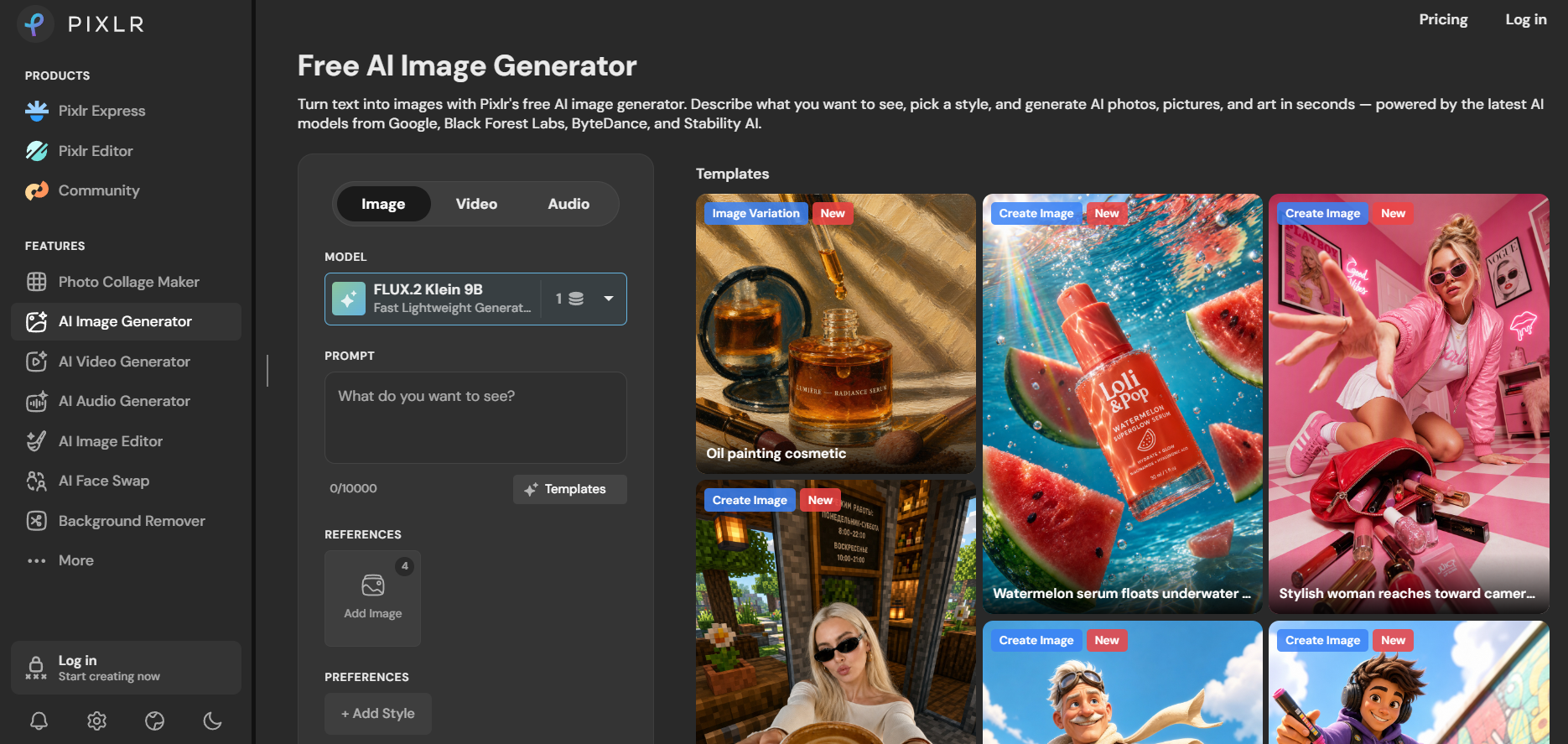
Pixlr AI Image Generator is a browser-based generative art creation tool embedded directly within the Pixlr design environment. It allows users to turn text prompts into high-resolution visuals across diverse styles, including photorealism, digital art, vector graphics, and 3D renders. Operating alongside Pixlr’s photo editing tools (Pixlr E and Pixlr X), users can generate images and edit them using layer masks, color adjustments, typography, and background removal. Features include prompt assistance, negative prompts, aspect ratio selection, and style filter presets. It provides an accessible visual studio for content creators, marketers, and web designers.
Frequently Asked Questions
What is Pixlr AI Image Generator and how does it integrate with Pixlr photo tools?
Pixlr AI Image Generator is a text-to-image generator built directly into Pixlr’s web-based image editing ecosystem. Unlike standalone generators that produce isolated image files, Pixlr imports generated artwork straight onto multi-layer editing canvases (Pixlr X and Pixlr E). This allows users to immediately refine generated images using graphic overlays, filters, typography tools, touch-up brushes, and layout templates without leaving the platform.
What creative controls and style options does Pixlr AI provide?
Pixlr AI offers granular generation controls including prompt recommendations, negative prompting (excluding specific objects or colors), aspect ratio controls (16:9, 1:1, 9:16), and visual style presets (such as Photorealistic, Anime, Cinematic, Vector Art, Water Color, and Crafting). Users can also upload reference control images to guide composition and color distribution.
Is Pixlr AI suitable for professional graphic design and marketing work?
Yes, because Pixlr combines generative AI with full layer-based desktop photo editing capabilities, it is ideal for designing marketing banners, blog graphics, social media posts, thumbnails, and product mockups. Users can generate an AI background, insert text headers, drop in transparent product cutouts, and export optimized WebP, PNG, or JPG files in one continuous workspace.
Is Pixlr AI free to use, and how do generation credits work?
Pixlr AI operates on a freemium model where registered users receive daily free generation credits to experiment with text-to-image tools. Subscribing to Pixlr Plus or Premium plans unlocks higher monthly credit allocations, unlimited access to stock templates and asset libraries, high-speed priority servers, and commercial usage rights.
Are you the maker of Pixlr AI Image Generator?Add this badge to your website so visitors can see your rating.
56listing views
Live counters, all time. We show every maker the real numbers.

Want it in front of more people? Fast-track & upgrade this listing →
Alternatives
Best Pixlr AI Image Generator Alternatives
Looking for something like Pixlr AI Image Generator? These are the highest-scored Image Generation tools in our directory, ranked by score, never by who paid: Midjourney, YouCam Online Editor, Mage Space, Fotor, DALL·E 3 and more.

Midjourney
Image Generation
Generate stunning images from text prompts.

YouCam Online Editor
Image Generation
AI creative suite for generating and editing images and videos online.

Mage Space
Image Generation
AI platform for generating and editing images from text prompts.
Fotor
Image Generation
An all-in-one online photo editor, graphic design tool, and AI image generator.
DALL·E 3
Image Generation
OpenAI text-to-image generation.

Adobe Firefly
Image Generation
Adobe’s AI art tool focused on commercial-safe image generation and professional creative workflows.

Vizcom
Image Generation
AI platform that transforms sketches into realistic 3D product renders.

Raphael AI
Image Generation
Free AI image generator that creates images from text prompts.
📬 Get the best new AI tools by email
Only when we find tools worth your time. No spam, unsubscribe anytime.