Image Generation
Raphael AI
Free AI image generator that creates images from text prompts.
Free
★★★★½
4.5
text-to-image
AI art
image generation
photorealistic images
concept art
illustrations
prompt-based AI
creative design
About Raphael AI
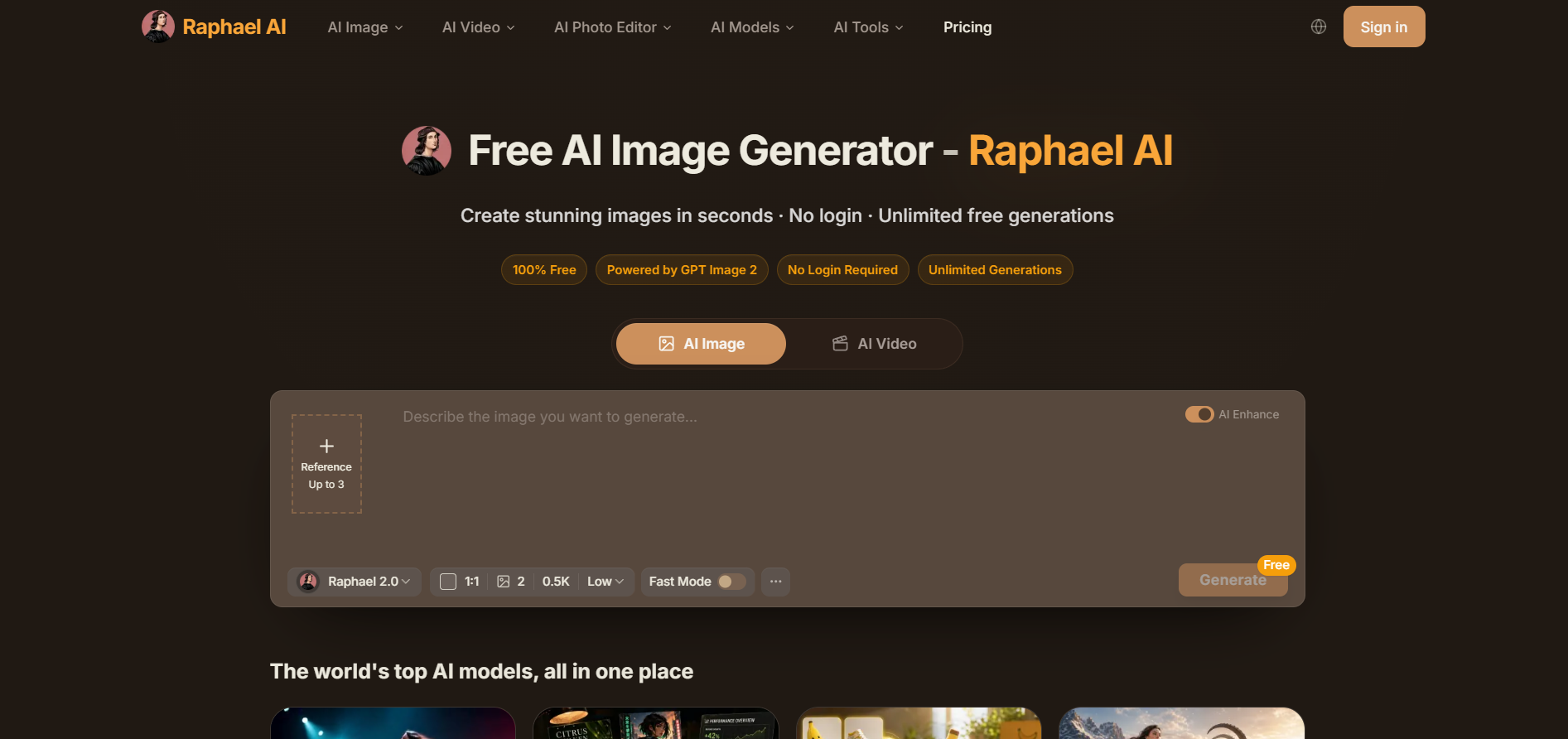
Raphael AI is a free AI-powered image generation platform that creates high-quality images from natural language prompts without requiring user registration. It supports multiple artistic styles, photorealistic rendering, illustrations, and concept art through an easy-to-use web interface. The platform is designed for creators, students, marketers, and hobbyists who need fast AI-generated visuals. Raphael AI focuses on accessibility by offering unlimited image generation with a simple prompt-based workflow. It is optimized for quick content creation and creative experimentation.
Frequently Asked Questions
What is Raphael AI and how does the platform work?
Raphael AI is a zero-friction, web- and mobile-based artificial intelligence creative platform specialized in text-to-image generation and advanced raster editing workflows. Operating with a "no-login required" accessibility model on its web tier (raphael.app), the workspace bridges rapid creative ideation with technical editing. The platform leverages an intelligent backend routing system that pairs user text prompts with top-tier foundation models—primarily powered by the Flux pipeline (Flux.1-Dev), alongside specialized architectures like NVIDIA Sana and Stable Diffusion XL (SDXL)—to render up to 1024px images in real time without the complex setups of specialized developer platforms.
How does Raphael AI handle user data privacy and generation history?
Raphael AI adopts a strict, consumer-first data privacy framework. By default, on the free web tier, the platform does not store user prompts or generated imagery on external, permanent servers. Instead, generations are rendered and held dynamically within the user's active browser session cache. This means that if a user refreshes their tab or closes the window, their generation history is permanently wiped. While this offers excellent privacy protection against data logging, it requires creators to manually download and save their favorite pieces locally as they work to prevent structural data loss.
What is the Raphael AI Tattoo Studio feature?
The mobile application version features a highly specialized AI Tattoo Generator studio designed explicitly for custom body art visualization. Users can enter a descriptive text prompt or upload a reference design, select from more than 20 distinct tattooing styles (such as traditional, fine-line, watercolor, or tribal), and use an advanced overlay tool. By uploading a photograph of their own body, the software handles perspective correction, lighting adjustment, and realistic skin wrapping, enabling individuals to visualize exactly how a design will look in physical space before committing to actual ink at a parlor.
What are the core image editing and manipulation tools available in Raphael AI?
Beyond standard text-to-image synthesis, Raphael AI functions as an interactive digital workspace equipped with multiple high-fidelity, natural-language editing features:
Select & Edit (Inpainting): Allows creators to highlight a specific zone of an uploaded or generated image and input standard text prompts to change, add, or swap out elements seamlessly.
Image Extender (Outpainting): An intelligent canvas reframe feature that naturally expands the borders of an existing composition while maintaining background consistency.
Erase Objects: A deep-learning cleanup tool designed to strip away unwanted artifacts, background distractions, or photobombers in seconds.
AI Upscaler & Background Remover: Transparent cutout engines and pixel restoration models designed to instantly turn blurry images into crisp, presentation-ready assets or clear e-commerce product listings.
Select & Edit (Inpainting): Allows creators to highlight a specific zone of an uploaded or generated image and input standard text prompts to change, add, or swap out elements seamlessly.
Image Extender (Outpainting): An intelligent canvas reframe feature that naturally expands the borders of an existing composition while maintaining background consistency.
Erase Objects: A deep-learning cleanup tool designed to strip away unwanted artifacts, background distractions, or photobombers in seconds.
AI Upscaler & Background Remover: Transparent cutout engines and pixel restoration models designed to instantly turn blurry images into crisp, presentation-ready assets or clear e-commerce product listings.
Similar Tools
More in Image Generation
Spline AI
Image Generation
An AI-powered 3D design tool to generate 3D objects, textures, and interactive scenes online.
Magnific AI (Freepik)
Image Generation
AI image upscaler that enhances images with realistic details.
Picsart
Image Generation
An all-in-one creative digital creation suite offering photo editing, video tools, and generative AI
Leonardo AI
Image Generation
An advanced generative AI platform for visual asset creation, image editing, and custom model traini
📬 The 5 best new AI tools, every Tuesday
One short email. No spam, unsubscribe anytime.