
Data & Analytics
MeshAnalyzer
MeshAnalyzer — a browser-based SaaS platform for 3D mesh analysis, printability validation.
Freemium
★★★★★
5.0 · 1 rating
About MeshAnalyzer
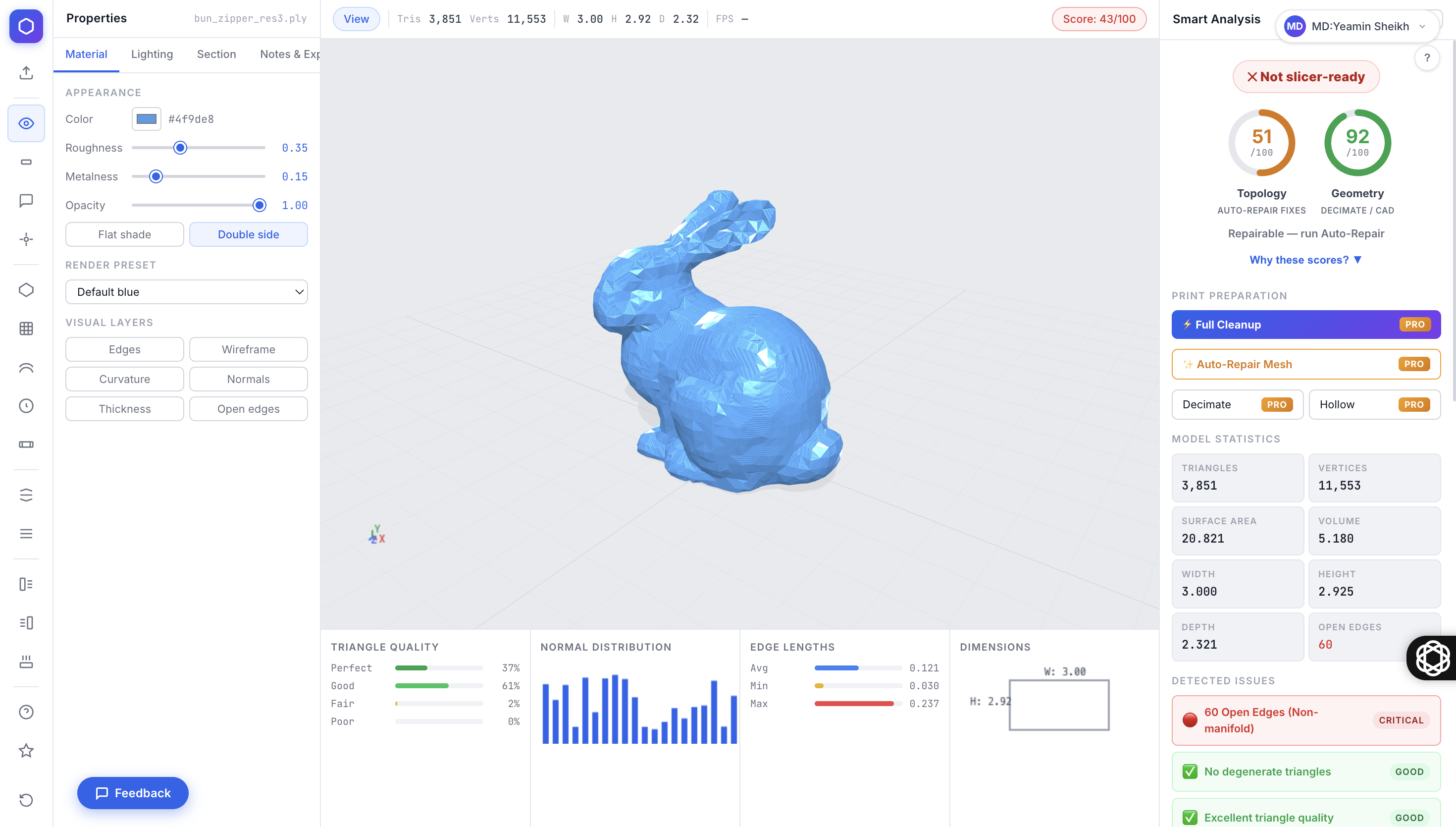
MeshAnalyzer is a professional, browser-based 3D mesh analysis, repair, and visualization tool designed for makers, CAD studios, and 3D print farms. Operating entirely within the browser without requiring any software installation or file uploads (ensuring maximum privacy during inspection), it seamlessly handles common 3D formats like STL, OBJ, GLB, PLY, and DAE.
The app features a Smart Analysis Engine that instantly assigns a Quality Score, detects open edges, and provides visual heatmaps for wall thickness, normals, and curvature. For advanced manufacturing, it calculates process-specific Print Readiness scores (FDM, SLA, SLS, CNC) alongside real-time cost and print-hour estimates based on material selection. The paid Pro tier unlocks powerful editing capabilities, including a 1-Click Auto-Repair tool that welds vertices and removes duplicate triangles, as well as functions to hollow, drain, decimate, and automatically orient models for optimal bed contact before exporting.
The app features a Smart Analysis Engine that instantly assigns a Quality Score, detects open edges, and provides visual heatmaps for wall thickness, normals, and curvature. For advanced manufacturing, it calculates process-specific Print Readiness scores (FDM, SLA, SLS, CNC) alongside real-time cost and print-hour estimates based on material selection. The paid Pro tier unlocks powerful editing capabilities, including a 1-Click Auto-Repair tool that welds vertices and removes duplicate triangles, as well as functions to hollow, drain, decimate, and automatically orient models for optimal bed contact before exporting.
Frequently Asked Questions
What is MeshAnalyzer used for?
MeshAnalyzer is used by 3D printing enthusiasts, CAD engineers, and designers to inspect, repair, and prepare 3D models for manufacturing. It identifies mesh errors like open edges or degenerate triangles and can automatically fix them to export clean, slicer-ready files.
How much does MeshAnalyzer cost?
MeshAnalyzer offers a 2-day free trial with no signup or credit card required. The Free plan includes unlimited inspection, analysis, and cost estimations. To access active editing tools like Auto-Repair, Auto-Orientation, decimation, and file exporting, you must upgrade to the Pro plan, which costs $9 per month.
Does MeshAnalyzer upload my 3D files to the cloud?
During inspection and analysis, your files never leave your machine; the tool runs locally in your browser. Files are only uploaded to encrypted servers if you upgrade to Pro and explicitly choose to save them to your Cloud Workspace or generate a public share link.
What file formats does it support?
MeshAnalyzer supports importing STL (ASCII and binary), OBJ, GLB, GLTF, PLY, and DAE files. On the Pro plan, you can export your cleaned models as binary STL or binary GLB files, which are highly optimized and much smaller in size.
Similar Tools
More in Data & Analytics

Segment
Data & Analytics
Customer data platform that collects, cleans, and routes user events to 300+ analytics and marketing tools.

dbt
Data & Analytics
Transform data in your warehouse using SQL, with built-in testing, documentation, and lineage.

Databricks
Data & Analytics
Unified analytics platform combining data engineering, ML, and BI on an open lakehouse architecture.

Lido
Data & Analytics
Streamlines PDF-to-Excel data conversion for finance teams.
📬 The 5 best new AI tools, every Tuesday
One short email. No spam, unsubscribe anytime.