
Voice & Speech
Balabolka
ree text-to-speech software supporting multiple speech engines
Website checked and live 2 days ago · how we check
Text-to-Speech
Speech Synthesis
Accessibility
Windows Software
Audio Export
Reading Assistant
Learning Tools
Document Reader
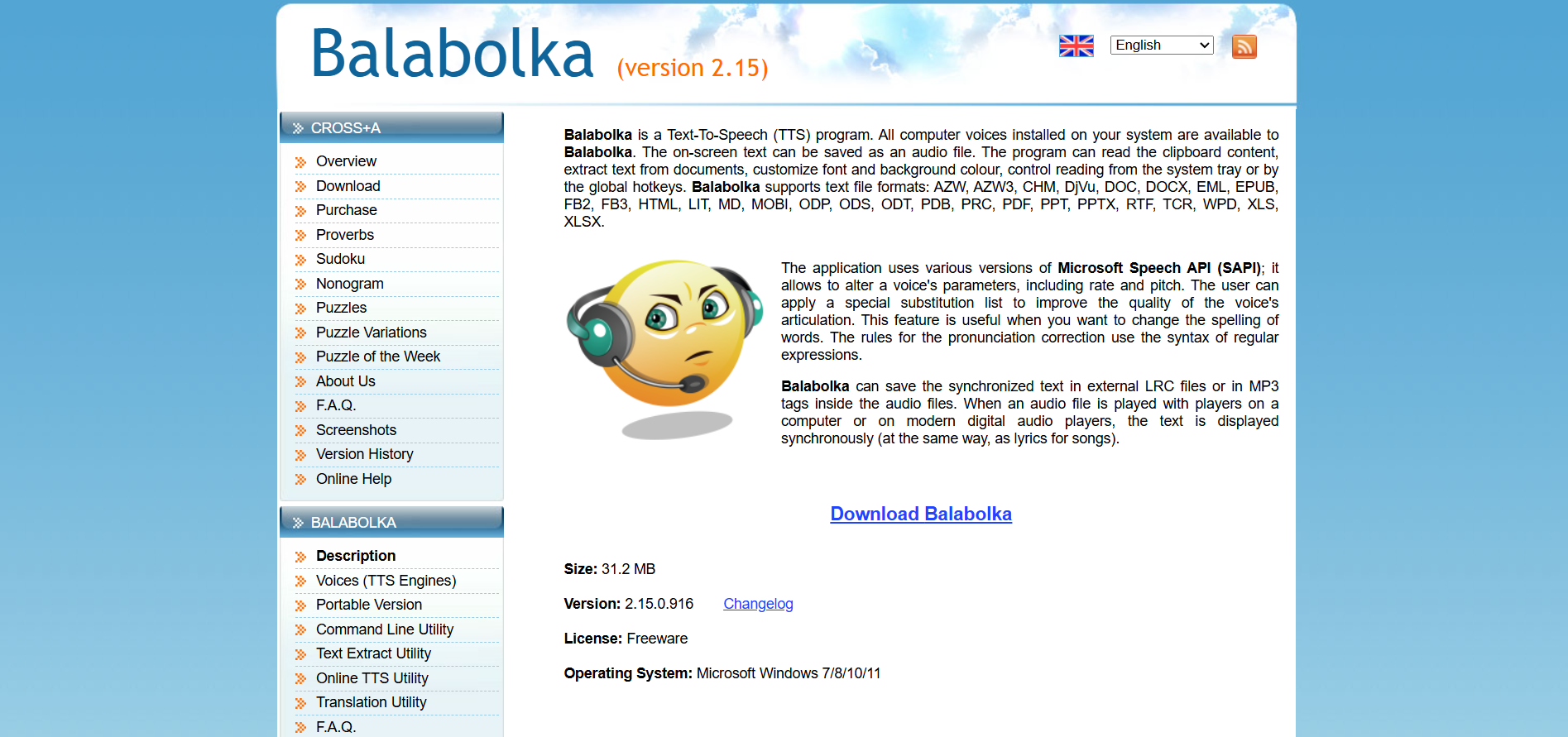
About Balabolka
Balabolka is a free text-to-speech program for Windows that reads text aloud using the voices installed on your computer, and can save spoken audio to files (MP3, WAV and more) — a long-standing, genuinely free tool popular for accessibility, proofreading by ear, and creating audio from documents without any subscription. It's not flashy or cloud-based, but it's free, offline, and does its job reliably, which keeps it beloved by a dedicated user base.
Balabolka works with the speech engines (SAPI voices) on your system, reads a wide range of file formats (TXT, DOC, PDF, EPUB, HTML and more), lets you adjust rate, pitch and volume, highlights words as they're read (helpful for reading along and accessibility), and saves audio for listening later. It supports many languages depending on the voices installed and requires no internet connection.
Balabolka is completely free, with no premium tier — a rarity that reflects its origins as a genuinely free utility.
Strengths: completely free with no catches, works offline, reads many file formats, saves to audio files, and offers accessibility features like word highlighting. Weaknesses: it relies on your system's installed voices, which are less natural than modern cloud neural voices (though better voices can be added), the interface is dated and Windows-only, and it lacks the polish of commercial tools.
For Windows users wanting a free way to have documents read aloud — for accessibility, proofreading by listening, or converting text to audio files — Balabolka is a reliable, no-cost classic. Those wanting the most natural-sounding voices should consider cloud tools like TTSMaker or ElevenLabs, but for free, offline, format-flexible reading, Balabolka delivers.
Balabolka works with the speech engines (SAPI voices) on your system, reads a wide range of file formats (TXT, DOC, PDF, EPUB, HTML and more), lets you adjust rate, pitch and volume, highlights words as they're read (helpful for reading along and accessibility), and saves audio for listening later. It supports many languages depending on the voices installed and requires no internet connection.
Balabolka is completely free, with no premium tier — a rarity that reflects its origins as a genuinely free utility.
Strengths: completely free with no catches, works offline, reads many file formats, saves to audio files, and offers accessibility features like word highlighting. Weaknesses: it relies on your system's installed voices, which are less natural than modern cloud neural voices (though better voices can be added), the interface is dated and Windows-only, and it lacks the polish of commercial tools.
For Windows users wanting a free way to have documents read aloud — for accessibility, proofreading by listening, or converting text to audio files — Balabolka is a reliable, no-cost classic. Those wanting the most natural-sounding voices should consider cloud tools like TTSMaker or ElevenLabs, but for free, offline, format-flexible reading, Balabolka delivers.
Frequently Asked Questions
What is Balabolka and how does it function?
Balabolka is a popular freeware Text-to-Speech (TTS) application built strictly for Windows. Its name comes from the Russian word for "chatterer." Unlike cloud-based AI voice generation sites, Balabolka runs entirely locally on your PC by utilizing the Microsoft Speech API (SAPI 4 and SAPI 5) and any native or third-party voice packs installed on your system.
Which file formats can Balabolka read and export?
Balabolka is known for its extensive file compatibility. It can extract and read on-screen text from almost any document format, including DOCX, PDF, EPUB, FB2, HTML, MOBI, and RTF. For saving files to listen to later, it can export the text directly into audio formats such as MP3, WAV, MP4, OGG, or WMA.
Can I use Balabolka's audio files for commercial YouTube videos?
Because Balabolka is freeware, the software itself doesn't restrict how you use the output audio. However, your right to monetize or use the audio commercially depends entirely on the license of the voice packs you use. If you use the standard built-in Microsoft voices, you must review Windows license terms, while third-party commercial voice packs require purchasing an explicit distribution or broadcast license from the voice creator.
How do I fix bad pronunciations or change how a word is read?
Balabolka features a highly customizable substitution list panel. If the system voice mispronounces a specific name, technical term, or foreign word, you can write a correction rule. For basic adjustments, you can map the word to its phonetic spelling. For advanced users, Balabolka supports Regular Expressions (RegEx) syntax to create complex rules that change word pronunciations contextually.
Is Balabolka free?
Yes — completely free with no premium tier or subscription. It's a genuinely free Windows text-to-speech utility.
What does Balabolka do?
Reads text aloud using your computer's installed voices, reads many file formats (TXT, PDF, DOC, EPUB and more), and saves spoken audio to MP3, WAV and other files.
Does Balabolka work offline?
Yes — it uses the speech voices installed on your Windows PC and requires no internet connection, unlike cloud-based TTS tools.
Why do Balabolka's voices sound less natural?
It uses your system's SAPI voices, which are less advanced than modern cloud neural voices. You can install better SAPI voices to improve quality.
What is Balabolka best for?
Accessibility, proofreading documents by listening, and converting text files to audio for free on Windows — especially when you need offline, format-flexible reading.
Are you the maker of Balabolka?Add this badge to your website so visitors can see your rating.
75listing views
Live counters, all time. We show every maker the real numbers.

Want it in front of more people? Fast-track & upgrade this listing →
Alternatives
Best Balabolka Alternatives
Looking for something like Balabolka? These are the highest-scored Voice & Speech tools in our directory, ranked by score, never by who paid: Auphonic, Maestra, Hedy AI, TTSMaker, Picovoice and more.
Auphonic
Voice & Speech● Live
AI audio post-production tool for leveling, noise reduction, and encoding.

Maestra
Voice & Speech● Live
AI platform for transcription, subtitles, translation, and voiceovers
Hedy AI
Voice & Speech● Live
AI meeting coach with real-time transcription, summaries, and live guidance.

TTSMaker
Voice & Speech● Live
Free AI text-to-speech tool with multilingual voice generation

Picovoice
Voice & Speech● Live
oice AI platform for on-device speech recognition and wake words
Microsoft Azure Speech
Voice & Speech● Live
Enterprise speech-to-text and text-to-speech API by Microsoft Azure.

Kits.ai
Voice & Speech● Live
AI platform for voice cloning, voice generation, and vocal creation

ElevenLabs
Voice & Speech● Live
Ultra-realistic text-to-speech and voice cloning.
📬 Get the best new AI tools by email
Only when we find tools worth your time. No spam, unsubscribe anytime.